

DynamoDB simulator
Connect your AWS SDK to local tables, inspect operations and test throttling and failed writes.
On this page
The DynamoDB simulator stands in for Amazon DynamoDB on your computer. Your application uses its normal AWS SDK; only the endpoint changes. Tables and items are kept by FlowReactor, and every call appears in the Activity timeline.
Add the simulator
- + Add › DynamoDB.
- Check Listens on 127.0.0.1, port (default
8000). - Choose Add DynamoDB simulator, then Start.
It starts with no tables. Your application creates them with CreateTable, as
it would against DynamoDB Local, or you can create them yourself in the
Tables tab.
Connect your application
Point the SDK's endpoint at http://127.0.0.1:8000. Any region and
credentials work, but the SDK needs some, so set test values if your machine
has none.
// AWSSDK.DynamoDBv2
var config = new AmazonDynamoDBConfig { ServiceURL = "http://127.0.0.1:8000" };
var client = new AmazonDynamoDBClient(
    new BasicAWSCredentials("local", "local"), config);
// @aws-sdk/client-dynamodb
import { DynamoDBClient } from '@aws-sdk/client-dynamodb'

const client = new DynamoDBClient({
  endpoint: 'http://127.0.0.1:8000',
  region: 'us-east-1',
  credentials: { accessKeyId: 'local', secretAccessKey: 'local' },
})
# boto3
import boto3

client = boto3.client(
    "dynamodb",
    endpoint_url="http://127.0.0.1:8000",
    region_name="us-east-1",
    aws_access_key_id="local",
    aws_secret_access_key="local",
)
What's supported
| Area | Support |
|---|---|
| Tables | CreateTable, DescribeTable, ListTables, UpdateTable, DeleteTable |
| Items | GetItem, PutItem, UpdateItem, DeleteItem |
| Reads | Query and Scan, with Limit, paging (ExclusiveStartKey) and parallel scans |
| Expressions | Key condition, filter, condition, projection and update expressions, and the older condition parameters |
| Indexes | Up to 20 global and 5 local secondary indexes, projecting all, keys only, or chosen attributes |
| Time to live | UpdateTimeToLive and DescribeTimeToLive; expired items disappear from reads immediately |
| Limits | 400 KB items and 1 MB result pages, as in DynamoDB |
Not supported yet: batch operations (BatchGetItem, BatchWriteItem),
transactions (TransactGetItems, TransactWriteItems), PartiQL and streams.
They return UnknownOperationException saying so. Billing mode is kept and
reported to clients but doesn't change behavior.
Tables and items
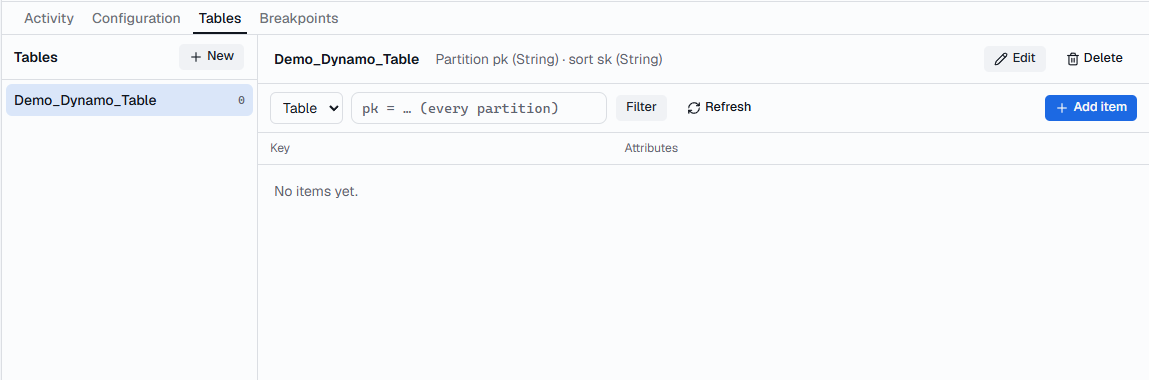
The Tables tab lists every table with its item count. Tables your application creates appear on their own.
- New sets the name, the partition key and optional sort key, global and local indexes, the time-to-live attribute and the billing mode.
- Select a table to browse its items. The list next to the filter box, showing Table, switches between the table and its indexes; the filter box narrows to one partition key value.
- Add item or select an item to edit it as DynamoDB JSON, such as
{"pk": {"S": "USER#1"}, "age": {"N": "42"}}.
Reads that could be cheaper
FlowReactor spots reads that would return the same items for less:
- a
Scanthat filters on a partition key, which could be aQuery; - a
Scanthat filters on the full primary key, which could be aGetItem; - a
Querythat filters on the sort key instead of putting it in the key condition.
These show as a lightbulb in the timeline and Could be cheaper on the operation, with the exact change to make. Filter the timeline on Avoidable reads to list them all.
Throttling and failed writes
Add a breakpoint, for example on PutItem
containing ORDER#, then Return error…:
| Error | Use it to test |
|---|---|
ProvisionedThroughputExceededException, ThrottlingException, RequestLimitExceeded |
Retries and back-off |
ConditionalCheckFailedException |
Optimistic locking and conditional writes |
TransactionConflictException |
Conflict handling |
InternalServerError, ServiceUnavailable |
Server errors |
Paused before the response, an error or Drop connection (lose result) tells your application a write failed when it actually succeeded: a good test of idempotent retries.