

PostgreSQL proxy
Inspect PostgreSQL queries, parameters and results, add latency and test SQL errors.
On this page
The PostgreSQL proxy sits between your application and a real PostgreSQL database. Your application connects to FlowReactor instead of the database; FlowReactor passes everything on, and shows you each query.
Your application keeps its own user, password and database. Only the host and port change.
Add the proxy
- + Add › PostgreSQL.
- Set Real database host and its Port (default
localhost,5432). - Check FlowReactor listens on 127.0.0.1, port (default
15432). - Choose Add PostgreSQL proxy, then Start.
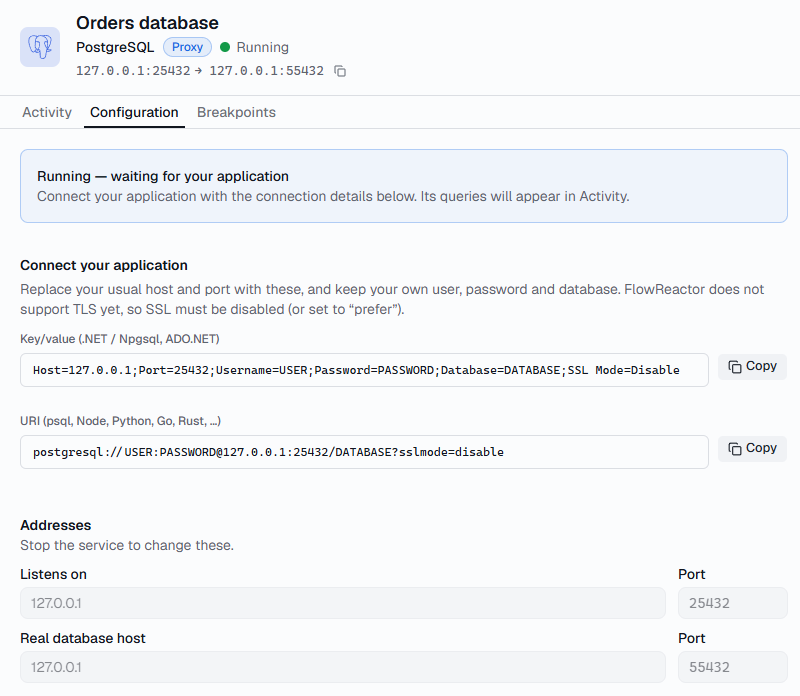
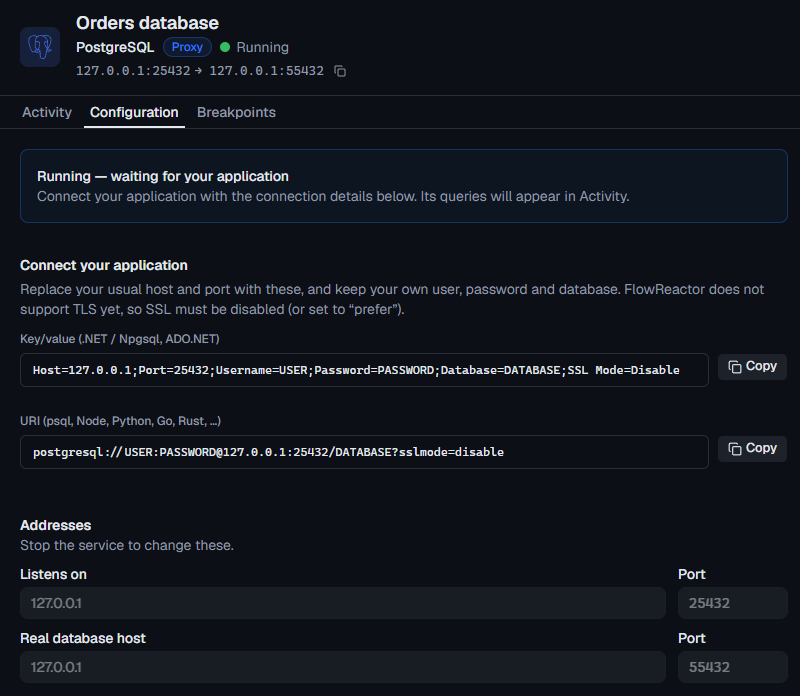
Connect your application
Point your connection at 127.0.0.1 and the proxy's port, with SSL turned
off. Configuration › Connect your application has these with copy buttons.
// Npgsql
var connectionString =
    "Host=127.0.0.1;Port=15432;Username=app;Password=secret;Database=shop;SSL Mode=Disable";
await using var dataSource = NpgsqlDataSource.Create(connectionString);
// pg
import pg from 'pg'

const pool = new pg.Pool({
  connectionString:
    'postgresql://app:[email protected]:15432/shop?sslmode=disable',
})
# psycopg
import psycopg

conn = psycopg.connect(
    "host=127.0.0.1 port=15432 dbname=shop user=app password=secret sslmode=disable"
)
Tools such as psql take the same URI:
postgresql://app:[email protected]:15432/shop?sslmode=disable.
Inspect forwarded requests
Each query appears in the Activity timeline as one
operation: a simple query, or one execution of a prepared statement. The
Operation is the SQL's first keyword (SELECT, INSERT, BEGIN…).
- Query shows the SQL, its parameters, whether it used the extended or simple protocol, the prepared statement's name, and any error with its severity, SQLSTATE, message, detail and hint.
- Results shows up to 20 rows of each result set. Several statements sent together appear as separate result sets; any the server skipped after an error are marked Not executed.
- Timing separates the database's time from any pause or injected latency.
Cancel requests are forwarded to the database and appear in the timeline.
Configure latency and failures
- Slow every query: set Latency under Faults. See Test how your app handles a slow database.
- Drop a connection: Active connections › Drop, to check that your connection pool recovers.
- Pause and fail one query: add a breakpoint
on, for example,
UPDATEcontainingorders, then Return error….
Paused before forwarding, Return error… makes the real database raise the error, so your application gets a genuine PostgreSQL error and any open transaction is aborted, just as in production. Paused before the response, the error replaces the real result. The presets are:
| SQLSTATE | Error |
|---|---|
40001 |
Serialization failure |
40P01 |
Deadlock detected |
57014 |
Query canceled |
53300 |
Too many connections |
23505 |
Unique violation |
57P01 |
Admin shutdown |
XX000 |
Internal error |
You can also enter any five-character SQLSTATE and your own message.
When it can't connect
If the real database can't be reached, FlowReactor closes your application's connection and the timeline says Could not reach upstream, with the reason. Login errors come straight from your database. See Troubleshooting.