

Managing services
Add, start, configure and remove the proxies and simulators in a project.
On this page
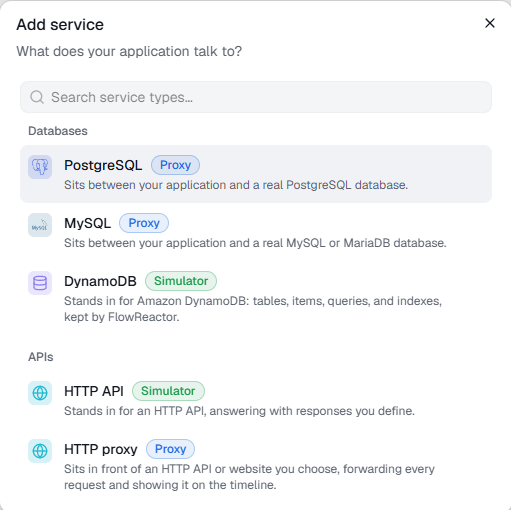
A service is one dependency your application talks to. Each service runs in one of two ways:
- Proxy: sits between your application and a real database or HTTP API, so you see and control the traffic while the real service answers.
- Simulator: stands in for the dependency entirely. FlowReactor answers, with data and responses you define.
| Service | Runs as | Default port |
|---|---|---|
| PostgreSQL | Proxy | 15432 |
| MySQL (and MariaDB) | Proxy | 13306 |
| DynamoDB | Simulator | 8000 |
| HTTP API | Simulator | 18080 |
| HTTP proxy | Proxy | 18081 |
| Cognito | Simulator | 9229 |
Add a service
- In the sidebar, next to Services, choose + Add.
- Pick what your application talks to. Search by name if the list is long.
- Give it a name and check the port. Database proxies also ask for the Real database host and its port, and the HTTP proxy for the URL it Forwards to.
- Choose Add. FlowReactor opens the new service's Configuration tab.
Start it and point your application at it
A new service starts stopped. Choose Start, in the service header or the Next: start box on Configuration. Once running, the service shows connection details: a base URL, an AWS SDK endpoint or database connection settings. Use those details in your application.
When your application connects, the box shows how many clients are connected, with a link to their activity.
The sidebar lists every service with its type and port. The header shows how many are running, and the … menu next to Services has Start all and Stop all.
A service's states
| State | Meaning |
|---|---|
| Stopped | Not listening. |
| Starting / Stopping | Changing state; Start and Stop wait. |
| Running | Listening on its port. |
| Failed | Couldn't start. The reason is shown under Start. |
The most common failure is a port that another program already uses:
could not listen on 127.0.0.1:…. Change the port (below) or stop the other
program.
Change addresses
The Addresses section of Configuration sets the port, and for database proxies, the real database host and port. Stop the service first: the fields are locked while it runs. Then choose Save addresses. An HTTP proxy's upstream URL is under Configuration › Upstream.
Duplicate, rename and remove
The … menu on a service in the sidebar has:
- Duplicate: a copy named "… copy" on the next free port, with the same configuration and breakpoints.
- Rename…
- Remove…: deletes the service with its configuration and breakpoints. This can't be undone. Stop the service first.
Services belong to the open project; save the project to keep your changes.